
Shüsh Support
Less noise. More life.
Shüsh is designed to make noisy environments easier to handle by reducing unwanted background noise while keeping conversation clear and understandable.
Whether you're trying to follow a conversation in a busy restaurant, reduce the constant hum of an air conditioner, or simply create a calmer listening environment, Shüsh gives you control over how much of the surrounding noise you hear.
Getting Started
Getting started with Shüsh only takes a few moments.
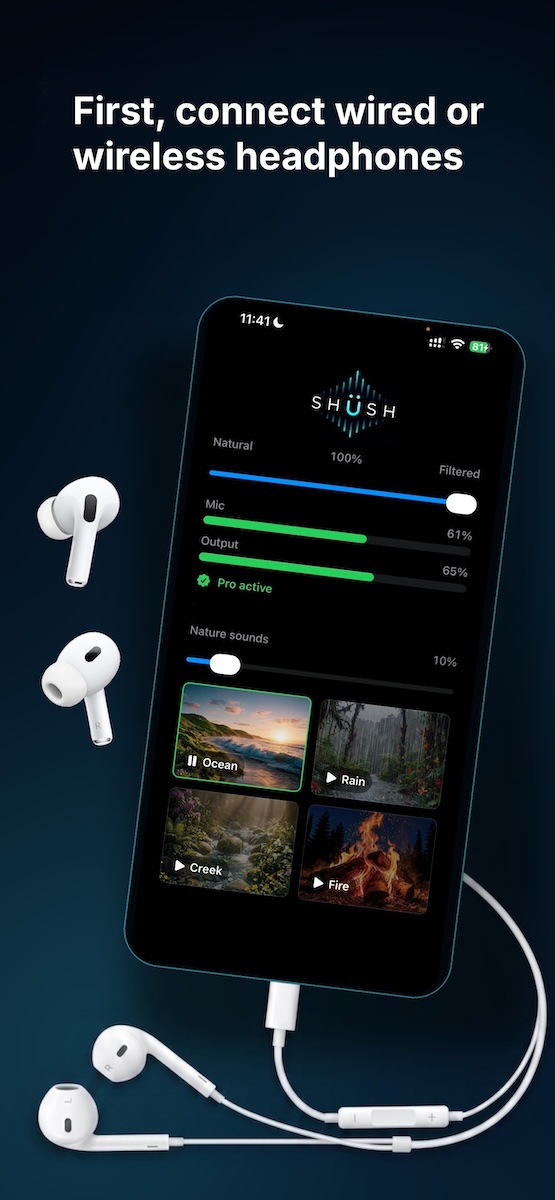
1. Connect your headphones
Connect wired headphones or pair your Bluetooth headphones, earbuds, or compatible hearing device with your phone.
For the lowest possible audio delay, wired headphones are recommended. Bluetooth devices may introduce a slight delay because of wireless transmission.
2. Open Shüsh
Launch the app and allow microphone access when prompted.
Shüsh uses your phone's microphone to listen to the surrounding environment, process the sound, and reduce unwanted noise.
3. Turn up the noise filtering
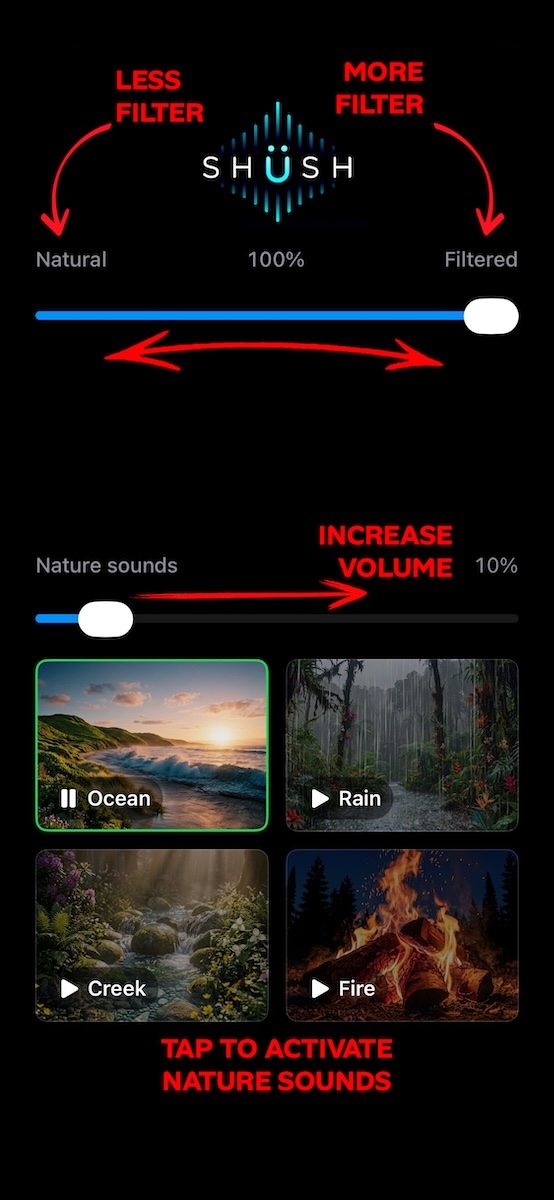
Move the Noise Reduction slider toward its highest setting.
You should immediately notice background sounds becoming less prominent while nearby conversation remains easier to hear.
4. Try a simple test
Want to hear what Shüsh can do?
Ask someone to speak while you gently crunch a cookie or snack wrapper nearby.
Listen first with noise reduction lowered, then move the slider toward maximum filtering.
You should notice the wrapper becoming significantly less distracting while the person's voice remains present.
Results can vary depending on the environment, distance from the speaker, microphone position, device, and type of noise.
5. Explore the nature sounds
Sometimes reducing noise is only part of creating a calmer environment.
Try one of Shüsh's built-in nature sounds:
- Ocean
- Rain
- Creek
- Fireplace
Adjust the sound to a comfortable level and combine it with noise reduction to create the listening environment that works best for you.
When to Use Shüsh
Shüsh can be useful whenever background noise makes conversation difficult, distracting, tiring, or overwhelming.
Try Shüsh in situations such as:
Crowded places
Restaurants, cafés, food courts, waiting rooms, airports, shopping centers, and other busy environments can create layers of competing sounds.
Shüsh can reduce much of that surrounding noise so you can focus more easily on the person you are talking to.
On the street
Traffic, engines, horns, construction, and crowds can make conversations harder to follow.
Shüsh helps push these sounds into the background while keeping nearby speech more prominent.
Always remain aware of your surroundings when walking near traffic or other hazards.
Air conditioning and constant background noise
Fans, air conditioners, ventilation systems, refrigerators, generators, and other continuous sounds can become tiring over time.
Shüsh can reduce these persistent background sounds and create a more comfortable listening environment.
Social gatherings
Parties, family gatherings, meetings, and group events can quickly become noisy.
Use Shüsh when you want to concentrate more on the conversation immediately around you.
Triggering or distracting sounds
Sounds such as chewing, wrappers, repetitive noises, tapping, or nearby activity can sometimes become difficult to ignore.
Shüsh may help make some of these sounds less prominent.
When you simply want a calmer environment
You don't need to be in an extremely noisy place to use Shüsh.
Combine noise reduction with one of the nature sounds whenever you want to create a quieter, more comfortable personal listening environment.
Compatibility & System Requirements
iPhone and iPad
Shüsh requires:
iOS 26.0 or later
Compatible performance may vary depending on the device.
Android
Shüsh requires:
Android 10 or later
Performance may vary depending on the device manufacturer, processor, audio system, and Android configuration.
Headphones and hearing devices
Shüsh can be used with compatible:
- Wired headphones
- Wired earbuds
- Bluetooth headphones
- Bluetooth earbuds
- Bluetooth-enabled hearing devices
For the lowest possible latency, wired headphones or earbuds are recommended.
Bluetooth audio transmission inherently introduces some delay. The amount of delay varies depending on the device and Bluetooth implementation.
Shüsh Pro Subscription
Shüsh Pro gives you access to the app's premium features.
Shüsh Pro
$1.99 per month
The subscription automatically renews each month unless canceled.
You can cancel at any time.
Prices may vary by country or region and may be displayed in your local currency.
Managing or canceling your subscription on iPhone or iPad
Subscriptions purchased through Apple are managed through your Apple Account.
Open:
Settings → Your Name → Subscriptions → Shüsh
From there you can view or cancel your subscription.
Deleting the Shüsh app does not automatically cancel an active subscription.
Managing or canceling your subscription on Android
Subscriptions purchased through Google Play are managed through your Google Play account.
Open:
Google Play Store → Profile → Payments & subscriptions → Subscriptions → Shüsh
From there you can view or cancel your subscription.
Deleting the Shüsh app does not automatically cancel an active subscription.
Cancellation stops future renewals. You will normally retain access to your subscription benefits until the end of the current billing period.
Safety Information
Shüsh is designed to improve listening comfort by processing environmental sound. It is not a medical device.
Shüsh is not a substitute for professional care
Shüsh does not diagnose, treat, cure, prevent, or monitor hearing loss, tinnitus, misophonia, sensory processing conditions, autism spectrum conditions, or any other medical condition.
It should not replace:
- Hearing aids prescribed or configured by a qualified professional
- Medical hearing devices
- Audiological evaluations
- Medical diagnosis
- Treatment recommended by a healthcare professional
- Professional psychological or therapeutic care
If you are experiencing hearing loss, persistent ringing in the ears, ear pain, dizziness, sudden changes in hearing, or other hearing-related symptoms, consult a qualified healthcare professional.
Stay aware of your surroundings
Noise reduction may make environmental sounds less noticeable.
Do not use Shüsh in situations where hearing your surroundings is important for your safety.
Use particular caution:
- Near moving traffic
- While crossing streets
- While cycling
- While operating machinery
- While driving
- In environments where alarms, warnings, announcements, or instructions must be heard
Never use Shüsh in a way that prevents you from remaining aware of potential hazards around you.
Protect your hearing
Listening at excessive volume for extended periods may damage your hearing.
Use a comfortable listening level and reduce the volume if you experience discomfort.
Privacy
Your privacy matters to us.
Our Privacy Policy explains how Shüsh handles information, permissions, and data associated with your use of the app.
Read the Shüsh Privacy Policy →
Terms of Use
By downloading or using Shüsh, you agree to the applicable Terms of Use.
The Terms of Use explain important information regarding subscriptions, permitted use of the app, limitations, responsibilities, and other conditions associated with using Shüsh.
Frequently Asked Questions
What does Shüsh do?
Shüsh uses AI-powered audio processing to reduce unwanted environmental noise while preserving nearby conversation.
The goal is to make noisy environments more comfortable and make it easier to focus on the sounds that matter.
Does Shüsh eliminate every background sound?
No.
The amount of noise reduction depends on several factors, including the type of sound, environment, microphone position, distance from the speaker, and the device being used.
Some sounds are easier to separate from speech than others.
Will Shüsh eliminate 86% of noise in every situation?
No.
The level of noise reduction achieved can vary substantially depending on the environment and type of sound.
The stated noise-reduction performance reflects the capabilities of the underlying processing under appropriate conditions and should not be interpreted as a guarantee that exactly 86% of every sound will be removed in every real-world environment.
Does Shüsh work without headphones?
Shüsh is designed to be used with headphones, earbuds, or compatible hearing devices so that you can hear the processed audio clearly.
Can I use Bluetooth headphones?
Yes.
Shüsh works with compatible Bluetooth headphones and earbuds.
However, Bluetooth transmission introduces some audio delay. The amount of delay varies between devices.
For the lowest possible delay, wired headphones are recommended.
Can I use Shüsh with hearing aids?
Shüsh may work with compatible Bluetooth-enabled hearing devices that can receive audio from your phone.
Compatibility and latency depend on the specific hearing device and its connection method.
Shüsh does not replace a hearing aid or any hearing device prescribed by a healthcare professional.
Why does the audio sound slightly delayed?
Audio must travel from your phone's microphone through Shüsh's processing system and then to your headphones.
This introduces a small amount of processing latency.
Bluetooth connections normally add additional wireless latency.
For the lowest latency, use wired headphones or earbuds.
What does the Noise Reduction slider do?
The slider controls how strongly Shüsh filters the surrounding environment.
Move it higher when you want stronger filtering.
You may prefer a lower setting when you want to hear more of your surroundings.
Experiment with the setting until you find the balance that feels most comfortable.
What are the nature sounds for?
Nature sounds can help create a more comfortable listening environment by gently masking remaining background sounds.
Shüsh includes sounds such as ocean waves, rain, a flowing creek, and a fireplace.
You can adjust them according to your preference.
Why does Shüsh need microphone permission?
Shüsh needs access to your device's microphone to hear the surrounding environment and process the audio.
Without microphone access, Shüsh cannot perform real-time noise reduction.
For more information about how Shüsh handles data and permissions, please review our Privacy Policy.
Does Shüsh record my conversations?
Please refer to the Shüsh Privacy Policy for detailed information about microphone access, audio processing, data collection, and privacy.
Can I use Shüsh while driving?
No.
You should not use Shüsh in any situation where reducing your awareness of environmental sounds could create a safety risk.
This includes driving and other situations where hearing traffic, alarms, warnings, or other people is important.
Is Shüsh a medical device?
No.
Shüsh is not a medical device and is not intended to diagnose, treat, cure, prevent, or monitor any medical condition.
If you have concerns about your hearing or sensitivity to sound, consult an appropriate healthcare professional.
How do I cancel Shüsh Pro?
If you subscribed through Apple:
Settings → Your Name → Subscriptions → Shüsh
If you subscribed through Google Play:
Google Play Store → Profile → Payments & subscriptions → Subscriptions → Shüsh
Canceling prevents the subscription from renewing at the end of your current billing period.
Deleting the app does not cancel your subscription.
I changed phones. How do I restore my subscription?
Make sure you are signed in using the same Apple Account or Google account you used when purchasing Shüsh Pro.
Open Shüsh and use the available Restore Purchases option if necessary.
Shüsh isn't working correctly. What should I try?
First, check that:
- Your headphones or hearing device are properly connected.
- Shüsh has permission to access your microphone.
- Your device volume is at a comfortable level.
- Noise Reduction is enabled.
- No other application is currently interfering with microphone or audio access.
If the problem continues, close and reopen Shüsh.
You can also restart your phone and reconnect your headphones.
If you still experience problems, contact Shüsh Support.
Contact Shüsh Support
We're here to help.
If you have a question, encounter a problem, or want to tell us about your experience with Shüsh, contact:
When reporting a technical problem, including the following information can help us identify the issue more quickly:
- Your phone model
- iOS or Android version
- Shüsh app version
- Headphones, earbuds, or hearing device being used
- Whether the connection is wired or Bluetooth
- A brief description of what happened
- The steps that caused the problem
Please do not send sensitive personal, medical, or confidential information when contacting support.
Hear what matters.
Shüsh was created around a simple idea:
The world doesn't have to become silent for listening to become easier.
Reduce the noise. Keep the conversation. Find the level of calm that works for you.
Less noise. More life.